Gabbys Dollhouse: Cat Games
- 3.8
- Rating
- 10.00M
- Installs
- Free
- Price
 Analysis by App-foxy
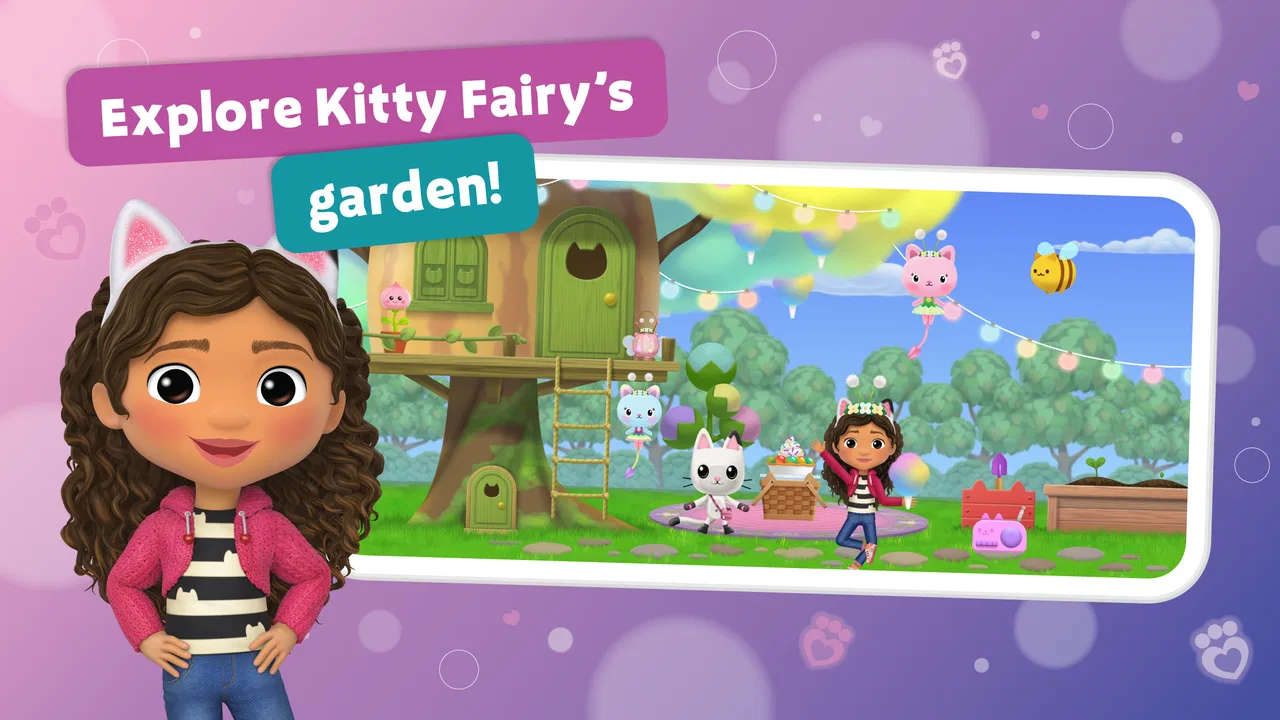
Gabbys Dollhouse: Games & Cats is the kind of educational game I would put in front of a child who enjoys familiar characters, bright activities, music, and making things more than traditional lessons. Developed by Play Piknik, it brings several types of play into one cat-themed space: simple games, musical moments, crafts, and coloring. I found that variety useful because a child can move from one activity to another without feeling pushed through a single fixed lesson.
The game is free to download and is rated for Everyone, which makes it approachable for families looking for a gentle first experience. It has reached over 10 million installs and holds a 4.1 average from around 29 thousand ratings, so it is clearly familiar to a large audience. Those numbers do not tell me whether every child will enjoy it, but they do suggest that the basic idea is easy for many families to understand.
My main recommendation is to treat it as a playful creative app rather than a complete learning program. It can encourage attention, choice-making, rhythm, visual recognition, and hand control, but it is not a replacement for a structured reading, mathematics, or language-learning tool. Its best value is the low-pressure path from curiosity to a small finished activity.
You May Also Like

 Pandora - Music & Podcasts
Pandora’s Music Is Easy to Start, but Harder to Recover
Pandora’s strength is its low-effort path from a seed to a station. Its weak spot is how much confidence it asks you to place in connection, setup, and quiet recovery.

 8 Ball Pool
 Is Built on Rivalries, Rematches, and Routine
A close look at the rivalries, rematches, shared routines, and unanswered safety questions that turn a quick pool match into a persistent mobile community.

 Samsung Music
’s Quiet Strength Is Playing What You Already Own
Its reach comes less from spectacle than from dependable access to a personal library. That simplicity is both the app’s strongest retention engine and its ceiling.

 AccuWeather: Weather Radar
AccuWeather Review: A Quick, Clear Forecast for Everyday Decisions
For everyday plans, the best forecast is the one you can understand quickly. AccuWeather makes rain timing, radar, and local conditions easy to act on, with a few trade-offs.

 Hill Climb Racing
Why Hill Climb Racing Still Turns Crashes Into One More Run
A tiny car, a bumpy hill and one more upgrade: Hill Climb Racing keeps resurfacing because its simple chaos makes every near-miss feel personal.

 AliExpress - Shopping App
AliExpress Makes Global Shopping Feel Personal, but Shoppers Bear the Risk
AliExpress turns a global marketplace into a pocket-sized discovery engine. Its reach is useful, its shopping loop compelling, and its trade-offs easy to miss.
More From Our News Desk
View All News


What the first session feels like
When I first approach a game like this with a child, I do not begin by asking whether it teaches enough. I watch whether the child can understand what to do without constant adult translation. Here, the familiar cat setting does much of the welcoming work. The activities are presented as playful destinations rather than as exercises, which helps a hesitant child tap around and discover what feels comfortable.
The mix of games, music, crafts, and coloring also changes the pace. Coloring suits a child who wants control and quiet concentration. Music is better for a child who wants immediate feedback and movement. Crafts can feel more purposeful because they suggest making something, while the games offer a clearer challenge. This range is more useful than a collection of nearly identical mini-games, especially when siblings or children of different moods share a device.
I would not expect long, uninterrupted sessions. The appeal is in short visits: a few minutes of coloring before dinner, a musical activity while waiting, or a craft after a child has finished a more demanding task. The game works best when the adult presents it as one option rather than an obligation. That keeps the playful tone intact and makes it easier to stop before the child becomes tired.
The store lists the game under educational entertainment, and that description feels fair. The learning is indirect. A child practices selecting, dragging, matching visual ideas, following a sequence, and noticing changes on screen, but the app does not turn those actions into formal instruction. For preschool-age users and early independent players, that can be a strength. For a child who specifically needs phonics, arithmetic practice, or a curriculum-linked activity, another app will be a better fit.
One detail I would explain before handing over the device is that the free download does not mean every possible part of the experience is necessarily included without payment. Optional in-app purchases range from $0.99 to $19.99 per item. I would review the purchase settings with the child present only if necessary, then make it clear which choices are available. That small conversation prevents a creative session from turning into an argument about tapping a locked or paid item.
Setting it up without making it complicated
The game was released on October 7, 2020, and the current version is 3.3.0. It requires Android 6.0 or later, so compatibility is worth checking before a child gets excited about playing. On a supported device, my advice is to install it while you have a quiet minute, open it yourself first, and look at the starting screen without rushing to pass the phone or tablet over.
This short preview is not about mastering the game. It is about learning where the main activity choices are and noticing whether the screen presents any purchase prompts or other decisions that need an adult. A child should be able to concentrate on choosing a cat-themed activity, not wait while a parent tries to understand the interface for the first time.
I also prefer using a tablet when available. Coloring and craft interactions are easier to see on a larger screen, and small fingers have more room to select the intended object. A phone can still work for a quick session, particularly for music or a short game, but the smaller display may make careful taps less comfortable. This is a practical trade-off rather than a flaw in the content.
For a shared family device, I would begin with a simple rule: the child can choose an activity, but an adult handles anything involving a purchase or a change they do not understand. That rule is more useful than giving a long explanation about every menu. It preserves independence while keeping the financial decision with the grown-up.
The first setup should also include a realistic expectation about attention. If the child opens the app expecting a full episode, a large story, or a long adventure, the collection of smaller activities may feel less impressive. I would describe it as a box of themed things to do. That wording matches the experience better and helps the child judge it by the quality of each short activity rather than by the length of a single storyline.
Finding the first meaningful success
For a first-time user, I would start with coloring. It is usually the clearest route to a visible result because the child can make a choice, apply it, and immediately see a change. I would avoid taking the device back to demonstrate every tap. Instead, I would name the goal in everyday language: choose a picture, pick something you like, and make one part look different.
That first completed patch of color matters more than it sounds. It shows the child that tapping has a purpose and that the app responds to personal choices. If the child makes an unexpected selection, I would not correct it unless they ask. The point is to build confidence in controlling the activity, not to produce a picture that looks the way an adult imagined.
After that, music is a useful second stop. It changes the kind of attention required: coloring rewards deliberate visual control, while music invites listening and timing. I would let the child repeat the same musical action rather than immediately moving on. Repetition can be the moment when the interface becomes familiar, and it gives the child a chance to notice cause and effect without pressure to perform.
Craft activities are a good next step for a child who likes making choices but loses interest in coloring. I would frame the task as creating something for fun, not as a test of neatness. If a child becomes frustrated, moving back to a simpler activity is sensible. The game is most effective when the child can recover quickly from confusion instead of feeling that one difficult screen has ended the session.
Games can come after the child understands the basic touch language of the app. A child who already knows how to select and change things may enjoy the extra challenge immediately. A younger or less experienced user may do better after a successful coloring or music activity has established that the screen is responsive. This order is my practical suggestion, not a required progression, but it makes the first visit calmer.
A realistic everyday use case is a short waiting period at a medical appointment or restaurant. I would choose one activity before handing over the device and agree that the session ends after that activity or after a brief timer. Because the app includes different forms of play, the child can choose between quiet coloring and something more active without needing another download. The adult still needs to supervise the choice, but the game can fill a small gap without demanding a full lesson plan.
Where children and parents may get confused
The biggest source of confusion is likely to be the difference between a free starting experience and optional paid items. Young children do not naturally separate “this looks interesting” from “this requires an adult decision.” If a child taps something unavailable, I would explain it plainly and redirect them to an activity they can use, rather than turning the moment into a lecture. The goal is to keep the boundary clear without making the game feel like a series of restrictions.
Another common issue is expecting every activity to suit every child. A child who loves coloring may not care about music. A child who wants immediate action may find careful craft work slow. I would not judge the whole app from the first activity that misses the mark. Give the child a chance to try a different type of play, then decide whether the collection matches their interests.
Parents may also mistake movement on the screen for educational progress. The game encourages useful early skills, but I would not use it as evidence that a child has learned a particular academic concept. If your main goal is letter sounds, counting practice, handwriting, or a clearly sequenced lesson, a dedicated educational app will give you more direct feedback. This game is better at encouraging exploration and creative control.
There is also a difference between recognizing a character and understanding an activity. Familiarity can help a child feel comfortable, but it does not guarantee that the child will know what to do next. When the child pauses, I would offer one small hint instead of completing the action for them. For example, pointing out that they can choose an item is more helpful than tapping it on their behalf.
Some families may find the variety slightly scattered. Moving between games, music, crafts, and coloring is enjoyable, but it does not create the same sense of progression as a focused course. I see that as the central trade-off: the app is flexible and welcoming, while a specialist alternative may be more organized and measurable. Choose this one for playful variety, not for a carefully staged academic pathway.
It is also worth considering the child’s tolerance for screen stimulation. A child who needs a quiet, slow activity may prefer coloring and crafts, while a child who becomes overexcited by sound or rapid interaction may need shorter sessions. I would watch the child’s behavior rather than assume that a child-friendly rating answers this question. Everyone-rated content can still be a poor match for a particular child’s temperament or routine.
Turning a short visit into a useful routine
Once the first activity feels comfortable, I would introduce a simple rotation: one creative choice on one day, music or a game on another, and a craft when the child wants to make something. This avoids repeating the same screen until it loses its appeal, while still giving the child a familiar structure. The rotation also lets a parent see which activities genuinely hold attention instead of assuming that the most colorful option is the favorite.
A helpful habit is to ask the child to describe what they changed or made after finishing. That conversation adds language practice that the game itself may not provide. The child can name a color, explain a choice, or tell you what happened when they tapped something. I like this approach because it turns passive screen time into a shared moment without interrupting the child during the activity.
If two children use the same device, I would give them separate turns rather than expecting them to collaborate on every selection. The activities are personal enough that one child may want to control the result. Taking turns also makes it easier to notice whether one child needs help with the interface. A short, predictable turn is usually less frustrating than an open-ended session where the more confident child takes over.
The app can also work as a transition activity. After a child finishes tidying toys, they might choose a brief coloring session; after a quiet reading period, they might try music. I would avoid using it as a reward for every small task, because that can make the app feel like the only enjoyable option. Used occasionally, it is a convenient bridge between parts of the day.
For adults deciding whether to keep it installed, the practical test is simple: does the child return to more than one type of activity, and can they begin with less help after a few sessions? If yes, the variety is doing useful work. If the child only wants one narrow activity and quickly loses interest, a more specialized app or an offline coloring book may offer better long-term value.
Who will enjoy it, and who should choose something else
I think it is a strong match for young fans of the Gabbys Dollhouse world who like colorful creative tasks and short bursts of play. It is also suitable for a parent who wants one free starting point that combines several cat-themed activities instead of installing separate games for music, coloring, and crafts. The Everyone rating makes it easy to consider for a broad family audience, while adult supervision still makes sense around purchases and device use.
I would be more cautious if your priority is measurable academic practice. A phonics app will usually be better for sound-letter work, a mathematics game will be better for number progression, and a drawing app may be better for children who want open-ended tools rather than themed activities. The choice depends on whether you want a character-led play collection or a focused learning instrument.
I would also skip it for a child who dislikes branded characters or wants a deep, continuously expanding game world. The appeal here comes from the recognizable theme and the variety of small activities. It is not the right substitute for a substantial adventure game, a serious music-learning tool, or a structured classroom companion.
Play Piknik has made a game that is easy to approach and broad enough to support different moods. In my experience, its strongest moment is not a dramatic challenge; it is the quiet satisfaction of a child choosing an activity, understanding the basic interaction, and finishing something without an adult taking control. That is a modest goal, but it is exactly why the game can work well for first-time users.
With the current version, 3.3.0, the sensible path is to check that the device runs Android 6.0 or later, preview the starting experience, and let the child begin with the most obvious creative activity. Keep the first session short, explain the purchase boundary, and move between coloring, music, crafts, and games according to the child’s mood. The app is free to start, but optional items cost between $0.99 and $19.99 each, so that small amount of preparation is worthwhile.
My final view is positive but specific: Gabbys Dollhouse: Games & Cats is a friendly first-step game for creative, character-loving children, not a complete educational curriculum. I would recommend it for relaxed family use, waiting-time entertainment, and children who gain confidence from seeing an immediate result. I would choose another option when the main need is structured academic progress, detailed creative tools, or a longer-form game. Used for what it does best, it gives a child an inviting route from the first tap to a small success.
FAQs for Gabbys Dollhouse: Cat Games
01What is Gabby's Dollhouse: Games & Cats about?
Gabby's Dollhouse: Games & Cats is a colorful and engaging app designed for young children, inspired by the popular Netflix series. It offers a variety of mini-games and interactive activities featuring Gabby and her adorable cat friends. The app aims to stimulate creativity and problem-solving while providing entertaining and educational content.
02Is Gabby's Dollhouse: Games & Cats safe for children?
Yes, Gabby's Dollhouse: Games & Cats is designed with child safety in mind. It is free from in-app purchases and third-party ads, ensuring that children can enjoy the game without unexpected costs or exposure to inappropriate content. Parental controls and guidance are integrated to provide a secure experience.
03What devices are compatible with Gabby's Dollhouse: Games & Cats?
Gabby's Dollhouse: Games & Cats is available on both Android and iOS devices. It is compatible with most smartphones and tablets running recent versions of these operating systems. It’s recommended to check the specific app store listing for detailed compatibility requirements to ensure optimal performance.
04Does Gabby's Dollhouse: Games & Cats require an internet connection?
Gabby's Dollhouse: Games & Cats can be played offline, making it convenient for travel or areas with limited internet access. However, some features, such as updates or additional content, may require an internet connection. It’s best to occasionally connect to Wi-Fi to ensure the app is up-to-date.
05How can I help my child get the most out of Gabby's Dollhouse: Games & Cats?
To maximize the educational benefits of Gabby's Dollhouse: Games & Cats, parents can engage with their children during gameplay. Encouraging discussions about the activities and characters can enhance learning and creativity. Additionally, exploring the app together can help guide your child through more challenging tasks, fostering problem-solving and critical thinking skills.
Pros
- Engaging mini-games for all ages.
- Colorful graphics enhance play experience.
- Encourages creativity and imagination.
- Easy navigation for younger users.
- Frequent updates add new content.
Cons
- Requires internet for full features.
- In-app purchases can be costly.
- Ads may interrupt gameplay.
- Limited educational content.
- Some features need premium access.

Gabbys Dollhouse: Cat Games
Gallery